
Multiple files uploading with Contact Form 7
How to make “Upload/Attach multiple files” feature with Contact Form 7 WordPress plugin. You can see a working example here: restorapic.com/contact/
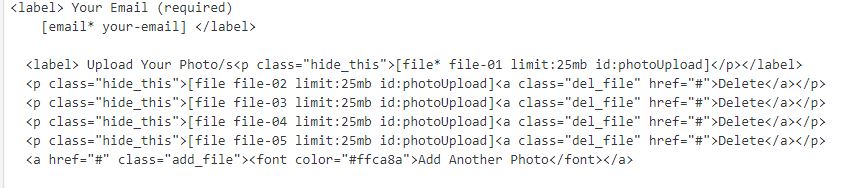
1. First of all, predefine set of file-upload inputs in plugin’s admin section:
<p class="hide_this">[file file-01]</p>
  <p class="hide_this">[file file-02]<a class="del_file" href="#">Delete</a></p>
  <p class="hide_this">[file file-03]<a class="del_file" href="#">Delete</a></p>
  <p class="hide_this">[file file-04]<a class="del_file" href="#">Delete</a></p>
  <p class="hide_this">[file file-05]<a class="del_file" href="#">Delete</a></p>
  <a href="#" class="add_file">Add Another file</a>
Set 5 (you can do more if you wish) inputs and links to “add” and “delete”. I also added some markup. You can see this step below:
2. Also, don’t forget to put the code [file-01][file-02][file-03][file-04][file-05] into “File attachments” field.
You can see this step below:

3. Then add some functionality with jQuery.
<script type="text/javascript">
  jQuery(document).ready(function($){

    //hide all inputs except the first one
    $('p.hide_this').not(':eq(0)').hide();

    //functionality for add-file link
    $('a.add_file').on('click', function(e){
      //show by click the first one from hidden inputs
      $('p.hide_this:not(:visible):first').show('slow');
      e.preventDefault();
    });

    //functionality for del-file link
    $('a.del_file').on('click', function(e){
      //var init
      var input_parent = $(this).parent();
      var input_wrap = input_parent.find('span');
      //reset field value
      input_wrap.html(input_wrap.html());
      //hide by click
      input_parent.hide('slow');
      e.preventDefault();
    });
  });
</script>
Summary

Article Name
ContactForm7 Multiple Files Uploading Feature
DescriptionMultiple files uploading with Contact Form 7 - How to make "Upload/Attach multiple files" feature with Contact Form 7 Wordpress plugin.
Author
Neil White
Publisher Name
RealSocialSEO
Publisher Logo
Comments are closed.